

Artificial Intelligence and Photography
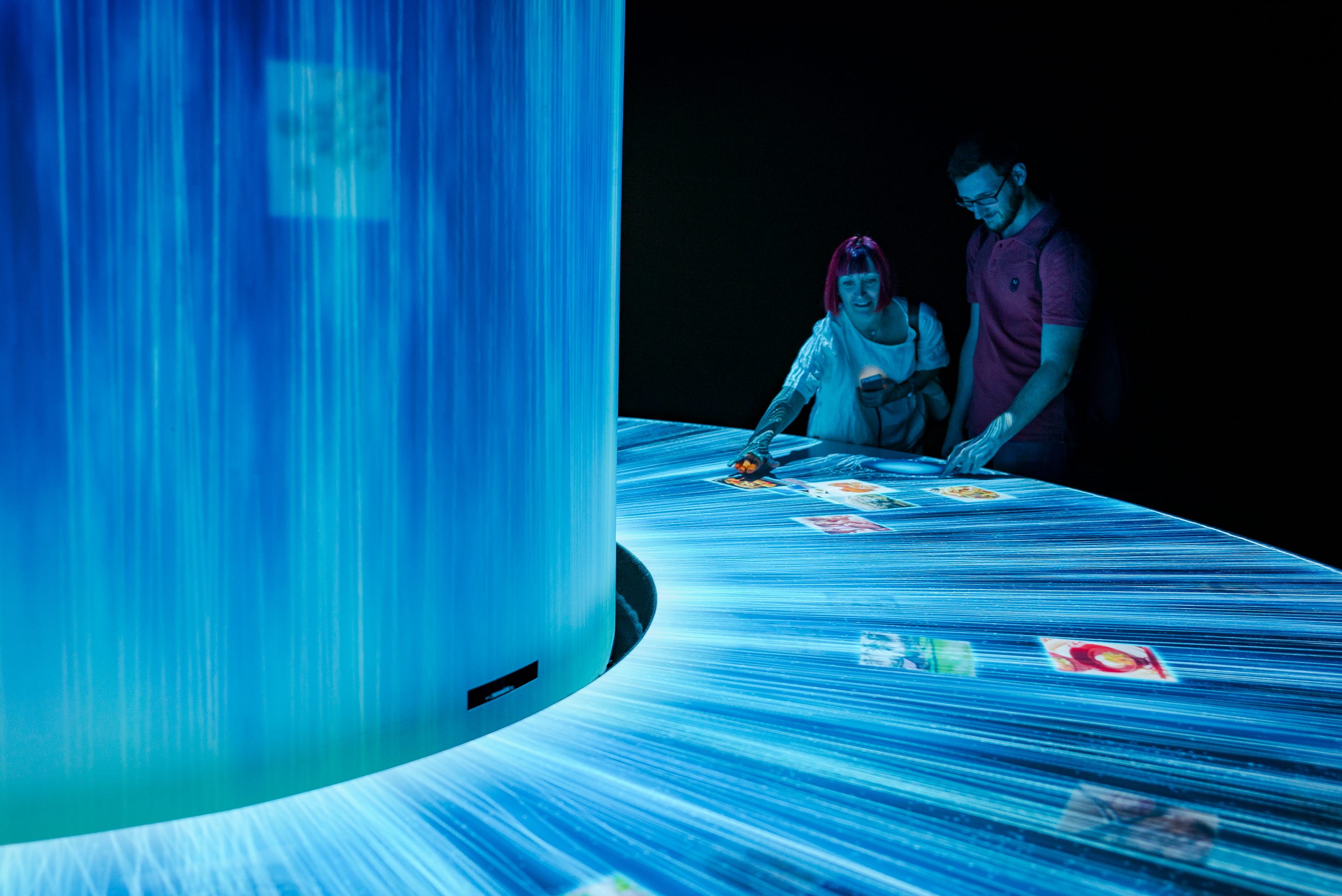
In this edition I’m exploring how AI tools might soon be taking on digital photography workflow tasks – and the consequences for photographers when AI takes control of digital photography.
I asked AI to search my image archive and find an appropriate image to illustrate “Artificial Intelligence” (above). I think it’s made an interesting choice. I’m not sure I would have made a better selection.
I also asked AI to write a caption for the image, without the benefit of any context or metadata. The caption I wrote includes specifics but AI produced a perfectly usable alternative.
My Caption:
“A man and a woman interact with a digital ‘waterfall’ of data at an immersive exhibit inside the Japan Pavilion, Expo Milano 2015, Milan, Italy.”
AI Caption:
“Two people interact with projected images on an illuminated interactive table display in a dark exhibition space with blue ambient lighting and curtain backdrop.”
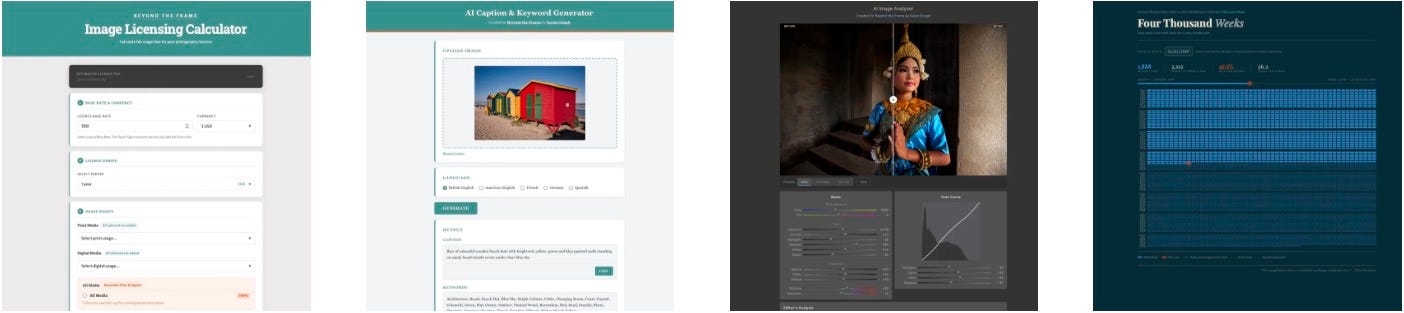
I spent a morning playing with AI tools, seeing what I could build simply by supplying text prompts. I have little experience with AI. I’m not a web designer or an experienced coder. I simply described what I wanted. The results are more impressive than I’d anticipated.
A fictional, AI-enhanced video created from the still image above.
Web Tools
I am simultaneously intrigued and apprehensive about AI. The potential benefits are probably beyond what we can imagine, but so too are the potential costs.
My fears are not allayed by the rhetoric coming from the broligarchy who control AI development.
“AI will probably most likely lead to the end of the world, but in the meantime, there’ll be great companies.” [sic]
– Sam Altman, CEO of OpenAI, owner of ChatGPT
Good to know. Thanks, Sam.
Understanding AI
However, before we all become extras in a Terminator spin-off, I think it’s wise to try and understand what AI is capable of. A better understanding will allow us to make more informed decisions about the degree to which we are happy to allow AI into our lives – assuming that’s even within our control!
The most optimistic analysis accepts that the art of photography will be completely redefined in the next 5–10 years, but I hope photographers can adapt and find an alternative path.
So what practical benefits can AI offer photographers right now?
How I built AI Web Tools
My elementary investigation began by building some simple web applications.
I prompted Anthropic’s Claude AI with detailed descriptions of what I wanted. The more comprehensive the prompt, the better the results. All the code was created by AI.
It took about 10 minutes to build each tool! To me, that’s astonishing. I have a reasonable understanding of HTML, CSS, JavaScript etc. but the complexity of the apps AI built is beyond my comprehension.
AI was able to fine-tune the apps based on my preferences. It debugged code when needed, which was rare. Each of these tools was ready to publish in under 60 minutes. The relatively simple Four Thousand Weeks tool was built from scratch and published in under 15 minutes.
The tools are currently online and free to test. You are very welcome to try them out.
Image Analyser
Every digital imaging tool already has automated features. In Lightroom, the Auto exposure button can recover shadows and highlights, adjust colours and contrast, calculating the ‘optimum’ development adjustments. I wanted to find out how simple it would be to build an effective AI-driven tool.

The answer is: it’s incredibly simple. With a few text prompts, I was able to direct AI to build a reasonable Image Analyser Tool. I instructed AI to create a Lightroom-style Auto adjustment together with options for an Analogue Emulation and a Chrome Emulation (extra contrast and saturation).
I also instructed AI to provide a text interpretation of the image with explanations for its processing decisions. For the image above, this is what it produced:
Editorial: The composition features iconic colourful beach huts with excellent colour separation and clean lines, though the bright red hut dominates; slight exposure reduction preserves texture in the saturated surfaces whilst the clear sky and ocean context provide strong environmental storytelling.
White Balance: Slight warming and minor tint reduction to neutralise the blue sky whilst preserving the natural beach atmosphere and vibrant hut colours.
Exposure: Modest reduction to prevent blown highlights in the yellow roof and maintain detail across the bright beach scene.
Contrast: Gentle increase to add depth and separation between the colourful huts whilst maintaining the soft, coastal light quality.
Tonal Range: Careful highlight recovery with moderate shadow lift ensures detail retention in both the bright structures and darker door/window areas, whilst subtle black point adjustment maintains tonal depth.
Various adjustment sliders mirror the options found in Lightroom Classic and AI produced a decent user interface with very little prompting from me.
I wouldn’t necessarily recommend it as a viable way to process images. It was really just a proof of concept experiment. But I have to say, the results are way better than I expected. From this example, it’s easy to see how AI could be used by photographers to create a custom automation tool, based on their particular development preferences.
Go ahead, try it for yourself.
Caption & Keyword Generator
Adding captions and keywords is an irksome but essential admin task. Writing accurate captions helps me remember salient facts: names, locations, events, etc. Keywords help me locate specific images and make connections between themes.

As AI becomes increasingly sophisticated, its capacity to identify key elements in a photo is improving. I wanted to see how well AI can add relevant captions and keywords, so I built a Caption and Keyword Generator.
Upload an image
Select a language
Click [Generate]
In the example above, AI produced this caption and these keywords:
“Nepali woman carrying bundle of fresh green fodder on her back along rural mountain path, wearing traditional floral patterned clothing and headscarf”
Agriculture, Asia, Basket, Burden, Carrying, Clothing, Culture, Farming, Fodder, Green, Harvest, Headscarf, Himalayan, Labour, Livelihood, Mountain, Nepal, Outdoors, Portrait, Rural, Smiling, South Asia, Subsistence, Traditional, Transportation, Village, Woman, Work, Worker
How did AI know the woman is Nepali? I made a point of removing all metadata, there’s no geotag… She is Nepali, as it happens. But that’s a surprisingly accurate detail.
Would AI be so confident with other images? I ran some tests.
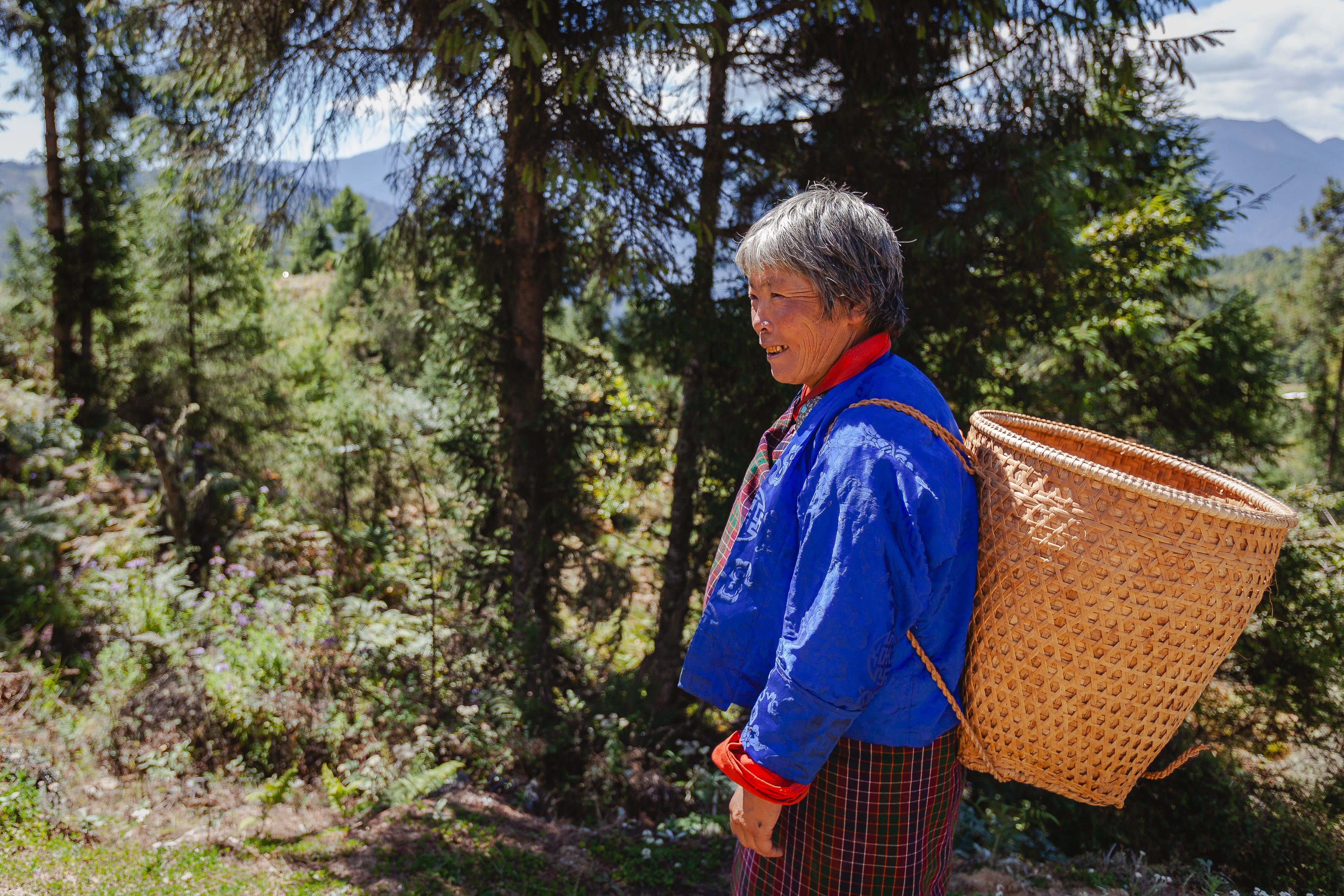
Elderly woman wearing traditional blue gho and plaid kira carries woven bamboo basket through pine forest in mountainous region of Bhutan.
– AI-generated caption
OK, those clothes are traditionally Bhutanese so there are clues but that’s also surprisingly accurate.
I tried many images, secretly hoping AI would make a mistake.
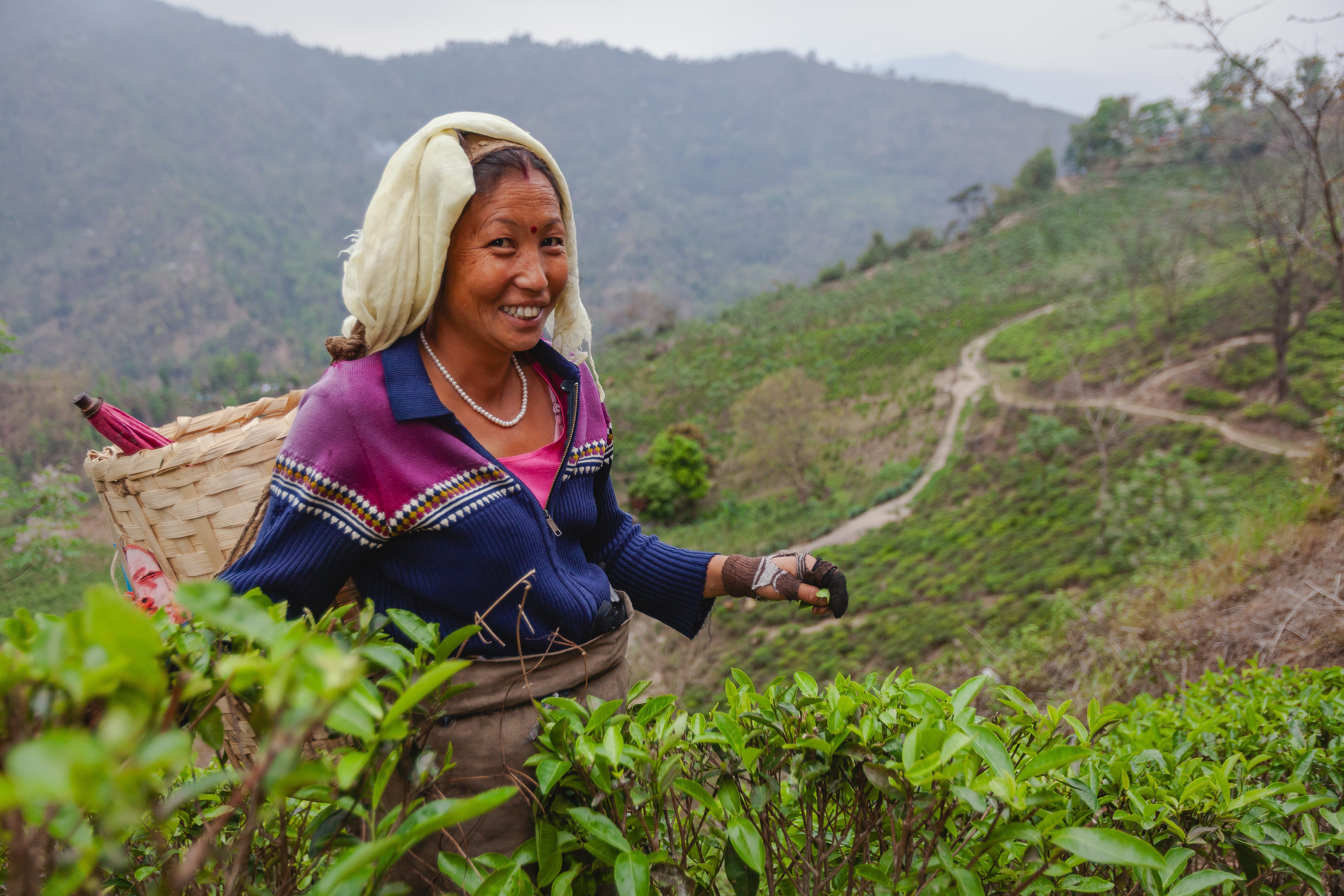
Woman tea picker harvesting fresh tea leaves on hillside plantation in mountainous region, wearing traditional ethnic minority clothing and carrying woven basket.
– AI-generated caption
For this photo, AI wasn’t so sure about the location, although did correctly identify the tea plants. Interestingly, it didn’t guess the location so this isn’t a bad caption to use as a starting point.
AI didn’t include the fact that the woman is smiling and I would have included that. It’s the kind of detail that seems important to me.
Agriculture, Asia, Basket, Cultivation, Ethnic Clothing, Farm Worker, Farming, Harvest, Hillside, Labour, Mountain, Outdoors, Picking, Plantation, Rural, Tea, Tea Leaves, Tea Picker, Traditional Clothing, Woman, Worker
– AI-generated Keywords
The keywords are pretty good too. There aren’t many that I’d add to the AI list, other than specific location details.
Pros
One thing that’s immediately apparent is that AI can write captions and keywords in languages that I don’t know. I added five languages to the tool but could have included pretty much any other. That’s a very useful addition for anybody providing stock images to libraries who want foreign language captions.
It would be simple to produce both American and British English spellings in captions and keywords, e.g. “Colour, Color”. That’s something that I try to remember to include when I’m adding keywords but I know I’m not always consistent.
Cons
AI is good at generic terms but can’t identify people without reference images. It won’t understand the nuance of a scene, can’t know the context. For now, AI can provide a useful foundation and fill in some gaps but the photographer will need to provide specific details for really accurate captions.
Summary
I don’t expect to be spending nearly as many hours writing tedious captions and keywords in future. That’s a welcome improvement but it also sounds an alarm bell as I realise this is a good example of how tantalising AI can be.
Image Licensing Calculator
I wrote about the Image Licensing Calculator in the previous edition. It’s a relatively straightforward tool. A spreadsheet can perform the same task quite easily – and, indeed, that’s what I’ve used for many years.

Pros
There are no AI functions in the tool’s calculation. Building this tool served as an experiment, for me to learn how quickly and easily AI can build a usable tool.
Genuinely, it works. I’ll use it in future and can point clients to the web page so they can perform their own licensing fee calculations.
Cons
Hmm, I can’t think of any downsides. Perhaps you can?
Summary
The tool was simple to build and it works. Job done.
Four Thousand Weeks Lifespan Chart
This isn’t related to photography specifically, but it is a thought-provoking tool.

I’m reading Oliver Burkeman’s book, Four Thousand Weeks. It has a simple, sobering premise. The average human lifespan is 4,000 weeks. We tend to think of age in years – and years can seem like a long time. Recalibrating to weeks reminds us that “the average human lifespan is absurdly, terrifyingly, insultingly short.”
The Four Thousand Weeks tool provides a visual illustration of our finite time on earth. The example above shows 4,000 weeks for a person born on 1 January, 1990. They will be 36 years old now and have already lived almost 50% of an average lifespan.
At a glance, we can see the weeks already lived and the time remaining until our 4,000th week.
It’s quite a stark illustration. And that’s the point, I suppose. Time slips by. Weeks turn into months. Months turn into years. Years turn into a lifetime.
You’re welcome to try it with your own date of birth. I take no responsibility for how it leaves you feeling.
The small orange dot indicates where we are now. The blank spaces ahead wait to be filled. Next week the unstoppable orange dot will have filled the next empty space. What will we have filled that week with?
What does AI mean for photographers?
I was going to write, “There’s good news and there’s bad news.”
That’s not really accurate. It’s very subjective.
Whether the news is good or bad depends upon one’s perspective.
If you don’t delight in time-consuming admin tasks, AI is likely to be your new best friend.
The Good?
Take the example photo at the top of this edition.
In less than three hours, I was able to prompt AI to build tools that can:
Analyse images
Make development adjustments
Write captions and keywords
Provide a professional licence fee calculation
It’s a small step to imagine a fully-automated workflow. Very soon I‘ll be able to insert a memory card into my computer and AI will run the complete workflow:
Ingest the images, make backups, delete duplicates
Cull the rejects – Adobe have recently added this functionality to Lightroom
Process the “Selects” in line with my development preferences
Write captions and keywords
Upload an optimised selection to my online archive
Process licensing enquiries and calculate fees
Deliver an invoice and check for completed payments
Put it this way, I’m not planning on writing any manual workflow tutorials in the near future!
The Bad?
If that seems like a great time-saving solution, I think it probably is. Either way, this picture of the future seems inevitable.
Very soon, there will be little reason to justify human involvement in the processing of digital images. Arguably, any human input will be meaningless, just one combination of adjustments from an infinite library of possibilities that AI can access instantly.
I’m choosing to gloss over the fact that AI can only be so clever because it’s been given free access to billions of digital images without asking (or compensating) the original copyright holders. That ship has long since left the harbour.
I don’t see a future where digital photographers are sitting at a screen, adjusting sliders in Lightroom or CaptureOne.
Some might argue that the human interpretation makes a difference. The photographer who made the image will know the context, understand the location, will know what the light was like at the time the image was made… all things that Artificial Intelligence cannot appreciate.
I hate to say it but the truth is, nobody cares.
Digital photographs will be valued to the same extent that McDonald’s values cows.
Pixels will enter the process at one end, AI-manipulated images will emerge at the other, captioned and ready for distribution. Nutritionally unsavoury yet ubiquitous and inexplicably popular.
A resurgence for film photography?
My prediction, for what it’s worth, is that people who appreciate the art of photography will return to film.
To some extent, that’s already happening. Sales of film stock have increased by 15–20% each year since 2022.
There’s been a 30% increase in photography workshops devoted to film between 2022 and 2024. 68% of photography enthusiasts under the age of 35 expressed a preference for working with film. (Source: Market Growth Reports)
‘Digital fatigue’ is already a genuine condition and I see photography diverging into two clear and distinct paths in the very near future.
Digital photography will become a professional occupation with diminishing returns. This won’t be news to many professional photographers. Ask a stock photographer who was making a handsome living in the latter part of the 20th century if they’re still raking in a generous monthly commission cheque and you’re likely to get a slap.
Almost all digital images will be made on devices no larger than your smartphone. Files will be processed and distributed automatically by AI.
Meanwhile, film photographers will make a point of eliminating AI and automation from their workflow. The distinction between analogue and digital will reach the point where they’re considered two very different disciplines.
Personally, I’m excited by that prospect.
I’m looking forward to Kodak announcing the reintroduction of Kodachrome (keep the faith). I won’t shed a tear when I’m no longer obliged to sit at a computer for hours on end, editing, processing, captioning, keywording.
I’m looking forward to using a Lightbox and a magnifying loupe again, handwriting captions on tiny stickers. Perhaps I’ll finally get back into a darkroom, a prospect that delights me.
You might wonder why I’ve spent time building AI tools if I’m not overly positive about an AI-driven photographic future? Much like viewing potential places to live, one needs to look around the premises, explore the garden, and drive around the neighbourhood before deciding whether it’s a place you’d like to call home.
For now, I’m still sufficiently intrigued by AI to try and understand its potential but I’m sure the day will soon arrive when it outpaces my ability to understand it. At that point, I shall return to film, return to the darkroom, return to a satisfying analogue existence. If that day is tomorrow, I won’t be sorry.
After all, there aren’t so many empty boxes remaining in my Four Thousand Weeks chart. I might as well fill them meaningfully! 🤩
“From today, painting is dead.”
– Paul Delaroche (painter), c. 1839 – upon first seeing a daguerreotype photograph.
Beyond the Frame Recommendations
Articles, documentaries, exhibitions, podcasts and more.
☆ Read – Is Documentary Photography at a Crossroads?

An article in Aperture magazine exploring the impact of Artificial Intelligence on Documentary photography.
The Winter 2025 edition of Aperture includes stories about “photographers who make pictures the slow way – building camera obscura, creating photograms, and labouring in traditional darkrooms to make handmade, unrepeatable forms.”
▶︎ Watch – Coded Bias
Coded Bias provides a fascinating insight into how AI algorithms are built upon skewed data, which can reinforce stereotypes and increase social exclusion.
Available on Apple TV+, Amazon Prime, and Kanopy.
✤ Create
A series of creative prompts, inspired by Brian Eno’s Oblique Strategies, and designed with photographers in mind.
Read more about the concept and learn how to use my Oblique Strategies for Photographers.
And finally…
Does AI feature in your daily life? Are you using AI for photography? I’m keen to learn how people are using AI and to what extent it’s now commonplace. How do you feel about AI? Excited? Nervous? Let me know in the comments.
Now I’m going to share this edition with AI and ask it to provide a final observation. Yes, I’m giving AI the final word – it seems that’s our likely destiny in any case. 😬
“There is a photograph that doesn’t exist yet. You haven’t made it. No algorithm predicted it. It will come from the specific weight of a particular morning, from a decision taken at the last second, from something you noticed that no one else thought to look for. That photograph cannot be automated. It can only be waited for – and you are the only one doing the waiting.”
– Claude AI
Until next time, go well.

◼︎ Directory: Archive of Beyond the Frame newsletters.
◼︎ Resources: Recommended books, films, gear, media etc.

Beyond the Frame 89/

Once upon a time in Paris a stranger posed an unexpected question.
Decades later, this is my response.
Good article , Gavin.
AI is a new tool, both good and bad. Human society survived major advanced in technology in the past, in spite of domsday profecies. As an acrylic artist the use of AI is a hot topic, much of it negative. For me, it's just another tool. Photography was supposedly going to end art! To the contrary, it advanced it and Did Not replace it. I use Midjourney to try out various ideas before commiting brush to canvas, and I am delighted with the results. AI is not a substitute for creativity, but certainly can be abused by the lazy.
Fascinating article, Gavin!
Thanks, especially, for sharing the Claude-built applications. I tried each one of them with a selfie I took of me in a radio station. The caption and keyword functions are astonishingly good (see below).
The online photo gallery I use (based on pixels . com) added AI caption generation sometime last year (as I recall). I've found it very helpful as a starting point for captions and nearly always need to tweak it, but it gives me a solid start and takes some of the drudgery out of putting images online.
Here's an example of an AI-generated caption, to which I only added the location and copyright info:
https://bw1970s.com/featured/mision-evangelica-la-palabra-viva-with-moon-jeremy-butler.html
AI Image Analyser was less successful--at least in the "auto" mode. It pumped up the contrast so much that many elements (including my bald head!) were blown out. However, I can see how having Lightroom-style controls would allow a user to adjust that. Its reasoning for the contrast boost?
"The image lacks punch with flat midtones, needing subtle contrast enhancement to separate the subject from the background and add depth to the equipment and broadcast console."
I can see how tools like this could be useful in photography education, because they provide explanations of photographic principles. You could show this explanation to a student and ask them, "So, what are 'flat midtones'? What is the point of subject-background separation?"
And the "Four Thousand Weeks" app? Well, as someone who's 72nd birthday is next month, it did cause a shiver to run down my spine. ;)
CAPTION:
"Radio broadcaster wearing headphones at control desk with mixing console, computer screen displaying scheduling software, and rack-mounted audio equipment in broadcast studio."
KEYWORDS:
Audio Equipment, Bald Man, Broadcast Studio, Broadcasting, Communication, Computer Monitor, Control Desk, Digital Display, Eyeglasses, Headphones, Indoor, Male, Media, Microphone Arm, Mixing Console, Professional, Radio, Radio Host, Radio Station, Rack Mount, Recording, Scheduling Software, Studio Equipment, Technology, Transmitter, Volunteer, Work, Workplace